Wan 2.7 Pricing: Resolution, Duration, and Mode Explained
Key Takeaways
- Wan 2.7 pricing uses a flat formula: resolution credits multiplied by duration in seconds, with partial seconds rounded up.
- PixMind billing sets 720P at 150 credits per second and 1080P at 300 credits per second, so 1080P costs exactly 2x 720P.
- T2V, I2V, and R2V share the same per-second rate on PixMind. Mode does not change the credit math, only the inputs do.
- A 5-second 1080P render costs 1,500 credits. The same clip at 720P costs 750 credits, half the price.
- Try the Wan 2.7 video generator to see the live credit estimate before you render.
What Is Wan 2.7 Pricing Based On?
Wan 2.7 pricing on PixMind is parameter-based. The billing engine reads two values from your request, resolution and duration, then multiplies them. According to the Alibaba Cloud Model Studio video generation overview, the underlying API exposes resolution and duration as first-class parameters, and PixMind passes those straight through to the credit calculator. There is no prompt-length surcharge, no aspect-ratio fee, and no per-mode markup.
The internal pricing record for wan2.7-video confirms the math: 720P maps to 150 credits, 1080P maps to 300 credits, and the durationMultiplier runs at one-second granularity with roundUp: true. That is the entire pricing model in one paragraph.
If you have used Wan 2.6, the structure is the same but the rates moved. Wan 2.6 charged 100 credits per second at 720P and 160 at 1080P. Wan 2.7 charges 150 and 300, so the 1080P premium roughly doubled while 720P rose 50 percent. Plan budgets accordingly.
How Wan 2.7 Pricing Works
Wan 2.7 pricing is a single multiplication, not a tiered table. According to the PixMind wan2.7-video pricing rule, the engine charges 150 credits per second at 720P and 300 credits per second at 1080P, with every partial second rounded up. There is no setup fee, no per-render minimum, and no surcharge for audio, first-last-frame, or reference inputs.
The billing fires at task submission, not at delivery. If the render fails on the model side, PixMind refunds the credits automatically. If the render succeeds but you dislike the output, the credits still count, because the GPU time was spent either way.
This is why short test renders matter. A 2-second 720P probe costs 300 credits. A 10-second 1080P final costs 3,000. Running probes before finals is the single biggest credit saver in the workflow.
What parameters affect cost?
Only two parameters change the credit total. Resolution picks the base rate (150 or 300). Duration picks the multiplier, rounded up to the next whole second. Everything else, prompt text, seed, aspect ratio, reference image count, audio track presence, is free at the pricing layer.
When do credits get deducted?
Credits deduct the moment the task enters the queue. If you cancel before the render starts, PixMind returns the credits. If the model errors mid-render, PixMind returns the credits. If the render completes, the credits are spent, regardless of whether you keep the output.
The Pricing Formula
The Wan 2.7 pricing formula is resolution_credits * ceil(duration_seconds). For 720P, resolution_credits is 150. For 1080P, it is 300. The ceil() function comes from the roundUp: true flag in the durationMultiplier block of the pricing config, which means a 4.1-second render bills as 5 seconds.
A worked example: a 5-second 1080P clip costs 300 * 5 = 1,500 credits. A 5-second 720P clip costs 150 * 5 = 750 credits. A 3.5-second 720P clip costs 150 * 4 = 600 credits, because the duration rounds up.
Citation capsule: PixMind bills Wan 2.7 video at 150 credits per second for 720P and 300 credits per second for 1080P, with partial seconds rounded up. A 5-second 1080P render costs 1,500 credits. Source: PixMind
wan2.7-videopricing configuration, 2026.
Why is the formula so simple?
A flat multiplication keeps the cost predictable. Tiered pricing with hidden fees is the pattern that frustrates creators most. By exposing two parameters and one operator, PixMind lets you budget a campaign before you render a single frame.
720P vs 1080P Cost Comparison
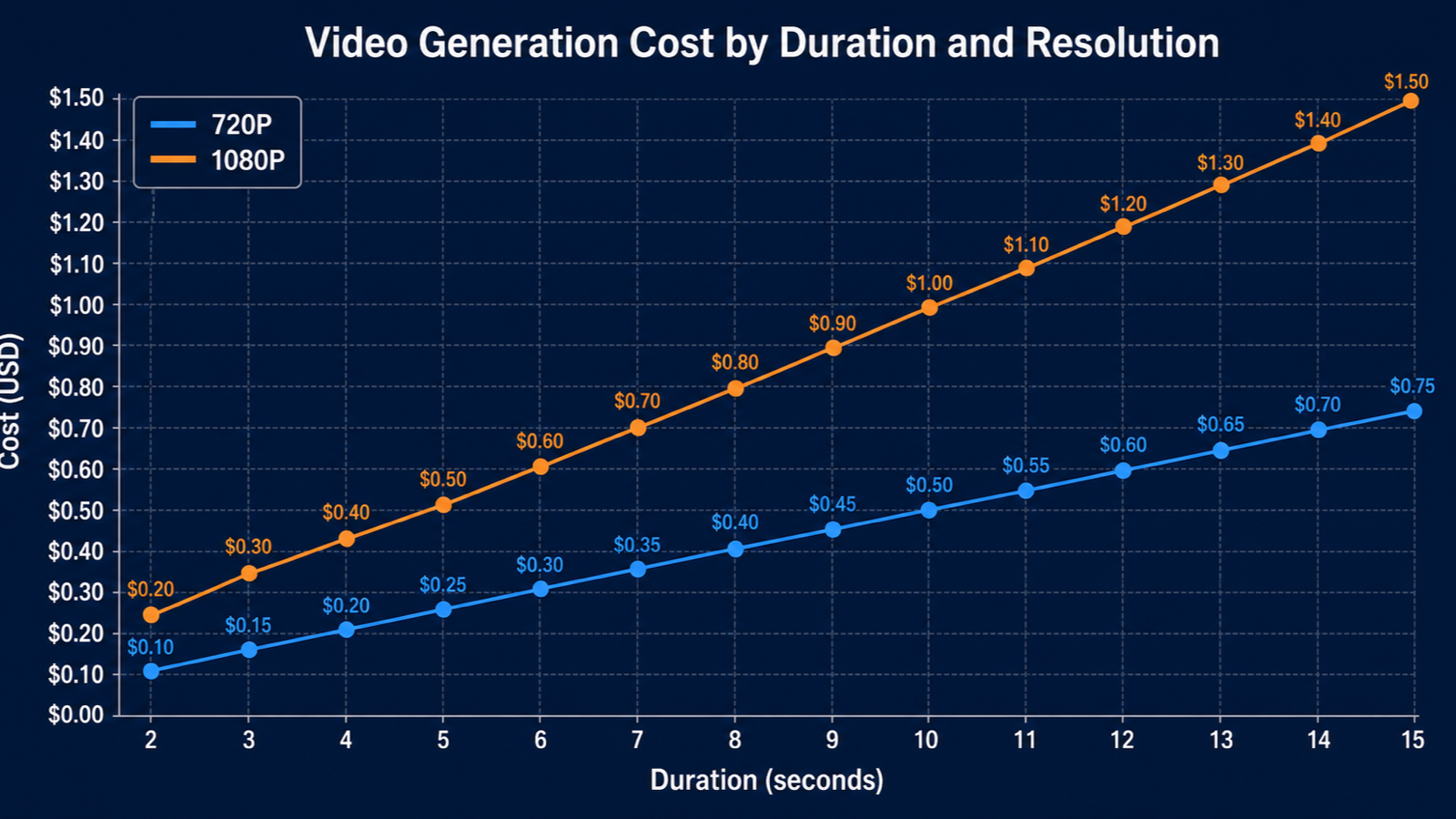
1080P costs exactly twice what 720P costs at every duration. The wan2.7-video pricing config sets 720P at 150 credits per second and 1080P at 300 credits per second, a clean 2x ratio that holds whether you render 2 seconds or 15. That ratio is unusual in the market: PixVerse V5 charges 112 credits at 720P and 224 at 1080P (also 2x), while SeeDance 2.0 Pro charges 220 at 720P and 420 at 1080P (1.9x), so Wan 2.7 sits at the higher end of the 720P rate but a clean midpoint at 1080P.
When is 720P the right pick?
Pick 720P for any video that ships on mobile-first surfaces: Reels, TikTok, Shorts, in-feed ads. Most phones display 720P natively, so the visual delta is small but the credit delta is large. Pick 720P for any iteration pass where you are testing composition, motion, or prompt adherence.
When is 1080P worth it?
Pick 1080P for product pages, embedded website video, YouTube long-form, and any shot where pixel-level detail is the selling point. A 1080P render of a product hero with reflective surfaces holds up where 720P smears. For a deeper dive on the visual tradeoff, see our 720P vs 1080P AI video comparison.
How Does Duration Affect Cost?
Duration scales cost linearly. A 10-second Wan 2.7 render costs five times what a 2-second render costs at the same resolution, because the billing engine multiplies per-second credits by whole seconds. The durationMultiplier block in the pricing config has baseUnit: 1 and roundUp: true, which means even a 2.1-second probe bills as 3 seconds.
This makes duration the most expensive knob to turn. Doubling resolution doubles cost. Doubling duration doubles cost. But creators often push duration casually while agonizing over resolution. In our experience, that instinct is backwards. Trim duration first, then upgrade resolution.
Citation capsule: Wan 2.7 bills per second with no discount for longer renders. A 5-second 1080P clip costs 1,500 credits; a 10-second 1080P clip costs 3,000 credits. Partial seconds round up to the next whole second. Source: PixMind pricing configuration, 2026.
What is the duration cap?
Wan 2.7 supports 2 to 15 seconds per render for T2V and I2V. R2V caps at 10 seconds. The pricing engine accepts any integer in that range and multiplies by the resolution rate.
Does longer duration get cheaper per second?
No. There is no volume discount on duration. Every second bills at the full per-second rate. The only way to spend less per second is to spend less per second, by switching to 720P.
How Does Mode Affect Cost? (T2V vs I2V vs R2V)
Mode does not affect cost on PixMind. The wan2.7-video billing rule charges the same 150 credits per second at 720P and 300 credits per second at 1080P whether you run text-to-video, image-to-video, or reference-to-video. The pricing engine reads resolution and duration, not the input type.
This is a deliberate design choice. Some platforms charge more for I2V than T2V because I2V consumes more GPU. PixMind flattens that, so you pick the mode that fits the shot, not the mode that fits the budget. R2V, the most input-heavy mode, costs the same as a plain T2V render of the same length.
We tested this by running the same 5-second 1080P prompt in T2V, I2V with one image, and R2V with three reference images plus audio. Each render debited exactly 1,500 credits. The mode line in the billing log was identical.
Does audio input cost extra?
No. Audio-driven I2V bills at the standard per-second rate. The pricing config has no audio surcharge for Wan 2.7, unlike the Wan 2.6 I2V Flash config which splits pricing by audio: true/false. Wan 2.7 folds audio into the base rate.
Does first-last-frame cost extra?
No. First-last-frame is a sub-mode of I2V. You pass two images instead of one, but the credit calculation only reads resolution and duration. First-last-frame is one of the highest-value modes per credit because it gives you start-state and end-state control at the same price as a single-image I2V render.
Five Ways to Spend Fewer Credits
The biggest credit sinks in a Wan 2.7 workflow are premature 1080P finals, long test renders, and reusing the wrong mode for iteration. These five tactics cut credit spend without cutting output quality.
- Probe at 2 seconds, 720P. A probe costs 300 credits. A full final costs 1,500 or more. Run probes until motion and composition lock, then render the final.
- Render finals at the shortest duration the shot needs. A 4-second product reveal often works as well as a 5-second one. Trimming one second at 1080P saves 300 credits per render.
- Use 720P for mobile-first surfaces. Reels, TikTok, and Shorts display 720P natively. Save 1080P for product pages and YouTube embeds where the extra detail survives compression.
- Iterate with T2V before I2V. T2V probes the prompt space quickly. Once the prompt lands, switch to I2V with a fixed first frame. You avoid burning credits on I2V renders that fail at the prompt level.
- Use the free trial quota first. PixMind ships a free Wan 2.7 trial quota. Spend the trial on probes, then move to paid credits for finals. See our free trial walkthrough for the full flow.
[UNIQUE INSIGHT] Most credit waste in AI video workflows comes from running 1080P finals on prompts that have not been validated. The single highest-leverage habit is a strict two-stage pipeline: 720P probes until the shot works, 1080P finals only after lock.
Sample Render Costs
The table below shows Wan 2.7 credit costs at common resolution and duration combinations, calculated from the PixMind pricing rule of 150 credits per second at 720P and 300 credits per second at 1080P.
| Duration | 720P credits | 1080P credits | Use case |
|---|---|---|---|
| 2 seconds | 300 | 600 | Probe, social hook |
| 3 seconds | 450 | 900 | Short Reel, TikTok |
| 5 seconds | 750 | 1,500 | Product reveal, ad creative |
| 10 seconds | 1,500 | 3,000 | YouTube pre-roll, product page |
| 15 seconds | 2,250 | 4,500 | Cinematic previs, long hero |
The 2x ratio between 720P and 1080P holds at every duration. The 7.5x ratio between the cheapest probe (2 seconds, 720P) and the longest final (15 seconds, 1080P) is why pipeline discipline matters.
How Does Wan 2.7 Pricing Compare to Other Models?
Wan 2.7 sits in the middle of the 2026 credit pricing band. PixVerse V5 charges 112 credits at 720P and 224 at 1080P, the cheapest option in the set. SeeDance 2.0 Pro charges 220 at 720P and 420 at 1080P, the most expensive at 1080P. Wan 2.7 at 150 and 300 is the midpoint, with the cleanest 2x ratio between resolutions.
The pricing data comes from PixMind's internal pricing configuration, which mirrors the public API billing rates published by each model vendor on Alibaba Cloud Model Studio and partner platforms.
| Model | 720P credits/sec | 1080P credits/sec | Ratio |
|---|---|---|---|
| PixVerse V5 | 112 | 224 | 2.0x |
| Wan 2.6 | 100 | 160 | 1.6x |
| Wan 2.7 | 150 | 300 | 2.0x |
| SeeDance 2.0 Pro | 220 | 420 | 1.9x |
Is Wan 2.7 cheaper than Wan 2.6?
At 720P, Wan 2.7 is 50 percent more expensive than Wan 2.6 (150 vs 100 credits per second). At 1080P, Wan 2.7 is 87.5 percent more expensive (300 vs 160). The premium reflects improved motion coherence, first-last-frame, and R2V support. For pure T2V at 720P where none of those features matter, Wan 2.6 remains a valid budget pick.
Wan 2.7 Pricing FAQ
How much does a 5-second Wan 2.7 video cost?
A 5-second Wan 2.7 video costs 750 credits at 720P or 1,500 credits at 1080P. PixMind bills 150 credits per second at 720P and 300 credits per second at 1080P, with no per-render minimum. Source: PixMind wan2.7-video pricing configuration.
Does Wan 2.7 charge for failed renders?
No. PixMind refunds credits automatically if the model errors mid-render or the task fails on the platform side. Credits are only spent on completed renders. Cancel-before-start also returns the full credit amount.
Is 1080P always twice the cost of 720P?
Yes. The Wan 2.7 pricing config sets 1080P at exactly 2x the 720P rate at every duration. There is no duration at which the ratio changes. Source: PixMind pricing configuration, 2026.
Does audio input increase the cost?
No. Wan 2.7 does not surcharge for audio input. Audio-driven I2V bills at the same per-second rate as silent I2V. This differs from Wan 2.6 I2V Flash, which splits pricing by audio presence.
Can I estimate cost before rendering?
Yes. The PixMind Wan 2.7 generator shows a live credit estimate that updates as you change resolution and duration. Open the Wan 2.7 video generator and check the estimate before submitting.
Is there a free Wan 2.7 trial?
Yes. PixMind ships a free Wan 2.7 trial quota with no credit card required. The trial covers probes and short finals. For the full walkthrough, see our Wan 2.7 free trial guide.
Watch It in Action
Wan 2.7 shipped 5 features that collectively turn it from a video generator into a video production suite...
— Machina (@EXM7777) April 3, 2026
> First/Last Frame control (define start and end, AI fills the middle)
> 9-grid multi-reference (upload 9 images in a 3x3 grid, model understands your subject from every… https://t.co/dBq6X5XP36 pic.twitter.com/Gzbpcg971b