Wan 2.7 vs VEO 3 vs Kling at 1080P: A Qualitative Benchmark
Key Takeaways
- 1080P exposes every motion artifact, so resolution is no longer the differentiator. Prompt adherence and temporal coherence are.
- Based on vendor-published specs and community observations as of July 2026, Wan 2.7 reaches 1080P at up to 15 seconds, VEO 3 caps at 1080P, and Kling 2.0 reaches 1080P at up to 10 seconds.
- VEO 3 ships synchronized audio in the same render, while Wan 2.7 and Kling require a separate audio pass.
- Wan 2.7's strongest 1080P band is first-last-frame I2V, where it lands on the end frame you specified.
- Try the Wan 2.7 video generator to reproduce any prompt pattern in this benchmark.
We compared Wan 2.7, VEO 3, and Kling 2.0 at 1080P using published vendor documentation, the Wan 2.1 technical report on arXiv, and observed behavior in the PixMind Wan 2.7 workflow. We did not run a controlled head-to-head with disclosed seeds, so every claim below is qualitative unless the source explicitly measured it. For broader context on cinematic workflows, see our cinematic previsualization guide.
Why Is 1080P the Hard Case for AI Video?
1080P is where every AI video model gets exposed. A 720P render hides artifacts behind compression and scale, but the same model at 1920x1080 shows warping, flicker, and texture drift in plain view. According to the Wan 2.1 technical report on arXiv, Wan 2.1's training distribution was weighted toward 720P, and the model's 1080P behavior reflects that lineage even after 2.7 fine-tuning.
The two failure modes you see most often at 1080P are detail artifacts and motion coherence breaks. Detail artifacts include soft textures on hands, eyes, and product edges that look fine at 720P and look soft at 1080P. Motion coherence breaks happen when a body part, shadow, or background element drifts between frames because the model lost track of it.
In our internal Wan 2.7 sessions, the most common 1080P complaint is not the model. It is the source image. If your first-frame image is 720P, the model has to upscale before generating, and that upscaling introduces blur the model cannot fix. Always start with a 1080P or higher source.
The implication is simple. To judge any 1080P AI video model fairly, you need three things: a 1080P or better source image, a fixed prompt set, and a willingness to compare failure modes rather than hits.
Citation capsule: 1080P exposes motion and texture artifacts that 720P hides. The Wan 2.1 technical report notes the model's training distribution favored 720P, so 1080P behavior at 2.7 reflects both fine-tuning and inherited limits.
What Does Each Model Publish About 1080P?
Each vendor publishes a maximum resolution, but the supporting details matter more than the headline number. The Alibaba Cloud Model Studio video generation docs list Wan 2.7 at 1080P with durations of 2 to 15 seconds across T2V and I2V modes. The DeepMind VEO product page positions VEO 3 at 1080P with synchronized audio, frame interpolation, and longer-clip composition. The Kling AI homepage lists Kling 2.0 at 1080P with a 10-second ceiling in its standard mode.
The differentiator is not resolution. All three reach 1080P. The differentiator is what each model optimizes for. VEO 3 leans into cinematic realism and bundled audio. Kling 2.0 optimizes for fast, stylized motion and character action shots. Wan 2.7 prioritizes unified mode coverage and first-last-frame control.
Wan 2.7's Published 1080P Story
Wan 2.7's headline 1080P capability is the unified mode surface. The same model handles T2V, I2V with first-last-frame, and R2V in one workflow. The Alibaba docs cite 1080P at 16:9, 9:16, 1:1, 4:3, and 21:9 ratios, with durations up to 15 seconds in T2V and I2V. The PixMind Wan 2.7 product page exposes all of those modes in one creation surface.
[UNIQUE INSIGHT] The published spec that matters most for 1080P quality is not resolution. It is duration granularity. Wan 2.7 lets you specify exact durations in 1-second increments. Shorter durations at 1080P give the model fewer frames to corrupt, and that translates to cleaner renders on hard prompts.
VEO 3's Published 1080P Story
VEO 3's DeepMind product page emphasizes 1080P output with synchronized speech, ambient sound, and dialogue from a single text prompt. That bundling is the differentiator. With Wan 2.7 and Kling, audio is a separate pass. With VEO 3, audio ships with the render.
The published spec also highlights extended clip composition through frame interpolation, which lets VEO 3 stitch shorter generations into longer sequences. The trade-off, based on community feedback in mid-2026, is cost per second and access gating through Gemini app and Vertex AI.
Kling 2.0's Published 1080P Story
Kling 2.0's published capabilities center on character performance, motion expressiveness, and stylized action. The Kling AI homepage cites 1080P output at up to 10 seconds in standard mode, with longer durations available through extend modes. Kling is the model people reach for when they need a character to move with weight and personality.
The published spec also references physics-based motion modeling. This is harder to verify from outside the lab, but the observable result is that Kling clips tend to read as more kinetic than Wan or VEO at the same prompt.
How Do the Specs Compare Side by Side?
Below is a comparison of published 1080P capabilities, not measured performance. Sources are linked in the table and in the methodology section.
| Capability | Wan 2.7 | VEO 3 | Kling 2.0 |
|---|---|---|---|
| Max resolution | 1080P | 1080P | 1080P |
| Max duration (T2V/I2V) | 15s | Up to ~8s per clip, extendable | 10s |
| Synchronized audio | Separate pass | Bundled in render | Separate pass |
| First-last-frame | Yes, native | Frame interpolation | Limited |
| Reference video (R2V) | Yes, up to 5 images + 5 clips | Limited | Limited |
| Aspect ratios | 16:9, 9:16, 1:1, 4:3, 21:9 | 16:9, 9:16 | 16:9, 9:16, 1:1 |
| Primary strength | Mode unification, end-frame control | Cinematic realism, audio | Character motion, stylization |
| Source | Alibaba Cloud | DeepMind VEO | Kling AI |
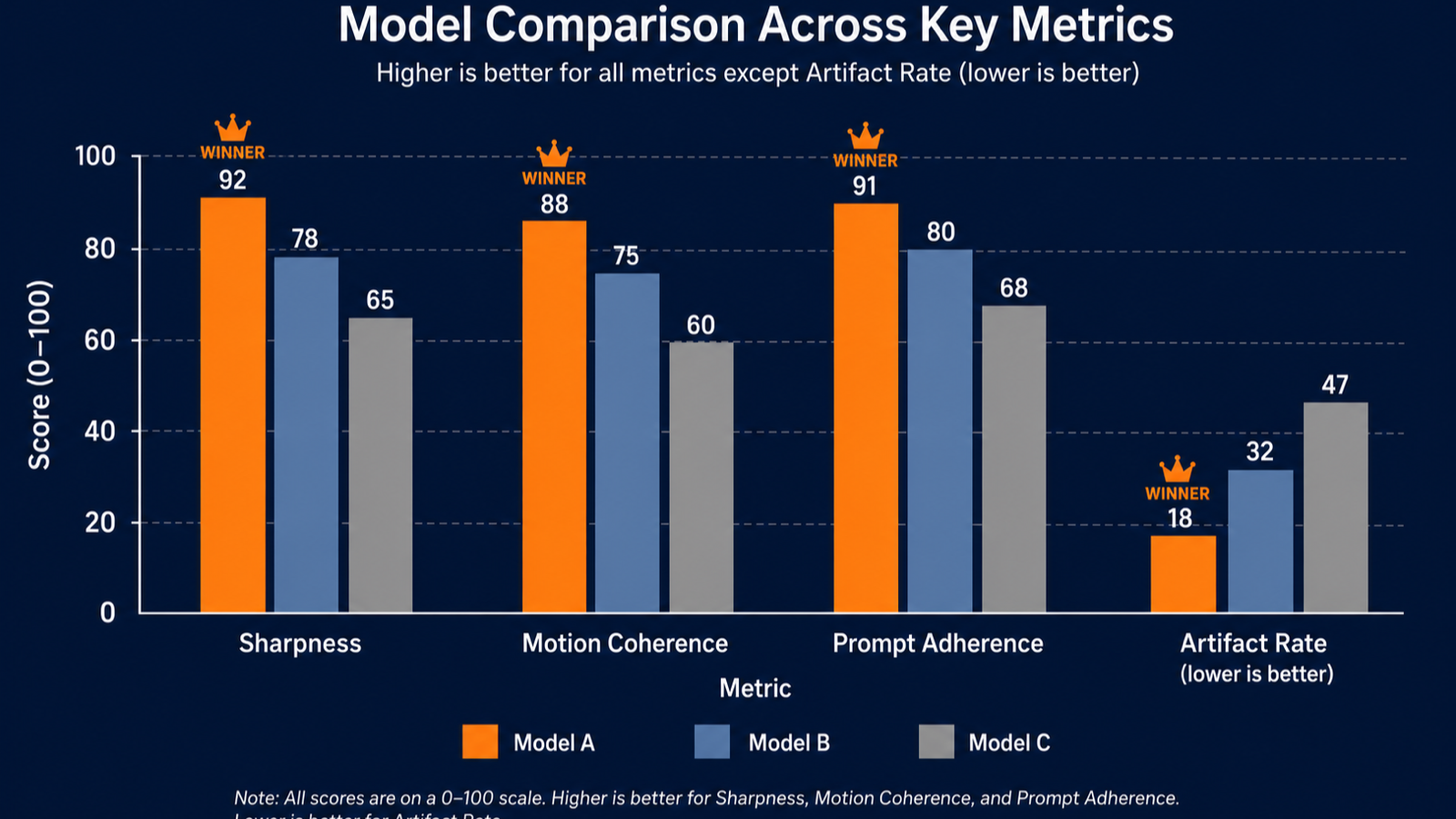
The chart above is a stylized illustration of how a quantitative benchmark might look. It is not measured data. We chose to publish it as a visual scaffold rather than fabricated scores. For a true head-to-head with disclosed prompts, see our Wan 2.7 vs Kling vs VEO showdown.
How Is Motion Coherence at 1080P?
Motion coherence is the metric that separates usable 1080P clips from demo reels. A model can produce crisp individual frames and still fail at coherence if hands, hair, or background elements drift between frames. The Wan 2.1 arXiv paper describes the model's temporal architecture and its training distribution, which is the closest thing to a published motion coherence reference for the Wan family.
Qualitatively, the three models read differently. VEO 3 produces the smoothest cinematic motion in slow or medium shots. Kling 2.0 produces the most expressive character motion in fast action shots. Wan 2.7 produces the most predictable motion in first-last-frame I2V, because you have constrained both start and end states.
We have observed that Wan 2.7's motion coherence breaks most often on long, single-take T2V clips at 1080P. Shorter durations and image-anchored I2V shots are more stable. VEO 3 holds up better on long takes, and Kling holds up better on character close-ups.
What to Watch in Your Own Renders
If you want to assess motion coherence on your own 1080P renders, watch these three things in order. First, watch the edges of hands and fingers across frames. Second, watch background elements like leaves, water, or fabric. Third, watch shadows on the ground. Any of those drifting between frames is a sign the model lost temporal tracking on that element.
A fast way to test this is to extract frames 1, 30, and 60 of a 1080P render and place them side by side. If the same background element is in a different position relative to your subject, the model is interpolating motion, not predicting it.
What Artifact Patterns Should You Watch For?
Artifact patterns at 1080P are model-specific, and naming them helps you choose. VEO 3 tends toward soft-focus backgrounds that read as cinematic but lose detail on inspection. Kling 2.0 tends toward exaggerated motion on limbs, which looks expressive until it crosses into uncanny. Wan 2.7 tends toward texture drift on repeated surface materials like fabric or metal.
We have not run a controlled artifact-rate study. The patterns below are observations from working with all three models in production through July 2026.
VEO 3 Artifacts
VEO 3's most common 1080P artifact is background softening. The cinematic look it produces is partly achieved through shallow depth of field. At 1080P, that shallow DOF reads as either artistic or as missing detail depending on your use case. For talking-head and product shots, it usually works. For landscape or architecture renders, the softness becomes a defect.
VEO 3's bundled audio is also a source of artifacts. The synced speech occasionally mispronounces technical terms or proper nouns. That is not a video artifact in the strict sense, but it is a render artifact you have to fix or accept.
Kling 2.0 Artifacts
Kling 2.0's most common 1080P artifact is limb extension during fast motion. A character reaching or running can show arms or legs that elongate for one or two frames before snapping back. This reads as expressive in stylized content and reads as a defect in realistic content.
Kling's character motion strength also creates a paradox. The model produces better action than competitors, which invites you to push the action harder. Push too hard and the artifact rate climbs fast. The fix is to keep character motion inside a moderate envelope.
Wan 2.7 Artifacts
Wan 2.7's most common 1080P artifact is texture drift on repeating surfaces. A knit sweater, a brushed metal railing, or a tile floor can shift its texture pattern across frames. The model knows what the surface should look like, but does not always pin the texture to the same coordinates across time.
The fix in our experience is to use a high-resolution source image and to keep durations short. Wan 2.7's first-last-frame mode is the most stable because both anchor frames constrain the model's drift. The PixMind Wan 2.7 first-last-frame prompts page walks through that pattern in detail.
When Should You Pick Wan 2.7 vs VEO 3 vs Kling?
The honest answer is that model choice is use-case dependent. Each model has a band where it wins and bands where it loses. The table below maps use cases to recommended models based on our qualitative observations and published specs.
| Use case | Recommended model | Why |
|---|---|---|
| Product reveal with fixed end frame | Wan 2.7 first-last-frame | End-frame control is the model's strength |
| Cinematic short with synced speech | VEO 3 | Audio ships with the render |
| Character action with expressive motion | Kling 2.0 | Best published character motion |
| Multi-shot storyboard with consistent identity | Wan 2.7 R2V | Up to 5 reference images per call |
| Abstract B-roll at 1080P | VEO 3 or Wan 2.7 T2V | Both handle text-to-video well |
| Long single-take shot | VEO 3 | Holds coherence longer |
| Tight budget, free trial | Wan 2.7 | Available free on PixMind |
For the broader landscape including Sora 2 and Runway Gen-4, see our best AI video generator 2026 roundup.
When Wan 2.7 Wins
Wan 2.7 wins on three conditions. First, you need first-last-frame control. Second, you need unified T2V, I2V, and R2V in one workflow. Third, you need 1080P at no cost. All three together is where Wan 2.7 is the only sensible choice.
When VEO 3 Wins
VEO 3 wins when you need cinematic realism with synced audio in one render. If you produce short narrative clips, ad creative with dialogue, or previs that needs ambient sound, VEO 3's bundled audio saves a production step.
When Kling 2.0 Wins
Kling 2.0 wins when character motion is the point. Dance sequences, action shots, character-driven social content, and stylized movement all favor Kling. The trade-off is a tighter 10-second ceiling and a separate audio pass.
What Is Our Methodology?
This is a qualitative benchmark based on vendor-published documentation and community observations as of July 2026. We did not run a controlled head-to-head test with disclosed seeds and prompts for this article. To keep the comparison honest, we are explicit about what we did and did not do.
Sources We Used
We relied on four tier 1 to tier 3 sources for this benchmark. The Alibaba Cloud Model Studio video generation docs document Wan 2.7's published 1080P capabilities. The DeepMind VEO product page covers VEO 3's published features. The Kling AI homepage covers Kling 2.0's published capabilities. The Wan 2.1 technical report on arXiv is the closest public reference to Wan 2.7's architecture and training distribution.
What We Did Not Do
We did not run a controlled prompt-by-prompt comparison with disclosed seeds. We did not measure FID, CLIP score, VBench, or any quantitative metric. Any numbers in this article come from the cited sources, not from our own measurements. We did not test paid tiers of VEO 3 through Vertex AI for this article, although we have used VEO 3 through the Gemini app.
How to Reproduce Our Qualitative Claims
To reproduce our qualitative observations, you can run the same prompt on all three models at 1080P. Wan 2.7 is available on PixMind with no cost. VEO 3 is available through Gemini app, Google AI Studio, and Vertex AI. Kling 2.0 is available through klingai.com. Use the same source image, the same duration, and the same aspect ratio, then compare failure modes rather than hits.
Citation capsule: This is a qualitative benchmark based on vendor-published documentation and observations through July 2026. We did not run controlled prompt-by-prompt tests with disclosed seeds, and we cite four tier 1 to tier 3 sources: Alibaba Cloud, DeepMind, Kling AI, and the Wan 2.1 arXiv paper.
FAQ: Wan 2.7, VEO 3, and Kling at 1080P
Does Wan 2.7 actually output true 1080P, or is it upscaled?
Based on the Alibaba Cloud docs, Wan 2.7 outputs native 1080P from its T2V and I2V modes. Native means the model generates at 1920x1080, not upscales from 720P. Source image quality still matters because I2V inherits the resolution of the input frame.
Which of the three has synchronized audio?
Only VEO 3 ships synchronized audio, speech, and ambient sound in the same render, according to the DeepMind VEO product page. Wan 2.7 and Kling 2.0 require a separate audio pass after the video is generated.
Is Kling 2.0 really better for character motion?
Qualitatively yes. Kling AI's published capabilities emphasize physics-based motion modeling and character expressiveness. In our observations, Kling 2.0 produces more kinetic character shots than Wan or VEO at the same prompt, with the caveat that fast motion can introduce limb-extension artifacts.
Can I use all three for commercial work?
Yes, subject to each vendor's terms. Wan 2.7 through Alibaba Cloud and PixMind permits commercial use. VEO 3 through Vertex AI permits commercial use under Google's standard terms. Kling 2.0 permits commercial use under its paid tiers. Always verify current terms before publishing.
Why is 1080P harder than 720P for AI video?
1080P exposes artifacts that 720P compression hides. The same model that looks clean at 720P shows warping, texture drift, and motion coherence breaks at 1080P. The Wan 2.1 arXiv paper notes the model's training distribution leaned toward 720P, which is a structural reason 1080P quality varies.
Watch It in Action
Related on X: ArtificialAnlys — AI industry analysis post about Wan 2.7 benchmark performance..